


File Upload
Swagger 2.0 supports file uploads sent with Content-Type: multipart/form-data. That is, your API server must consume multipart/form-data for this operation:
consumes: - multipart/form-dataThe operation payload is defined using formData parameters (not body parameters). The file parameter must have type: file:
paths: /upload: post: summary: Uploads a file. consumes: - multipart/form-data parameters: - in: formData name: upfile type: file description: The file to upload.This definition corresponds to the following HTTP request:
POST /uploadHost: example.comContent-Type: multipart/form-data; boundary=abcde12345Content-Length: 204
--abcde12345Content-Disposition: form-data; name="upfile"; filename="example.txt"Content-Type: text/plain
File contents go here.--abcde12345--Swagger UI displays file parameters using a file input control, allowing the users to browse for a local file to upload. 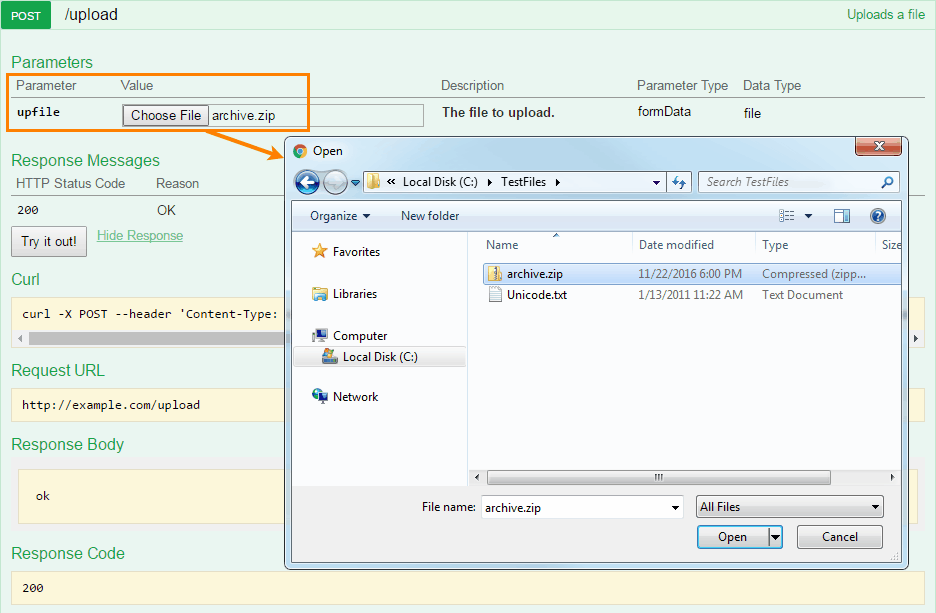
Upload a File + Other Data
Section titled “Upload a File + Other Data”File parameters can be sent along with other form data:
parameters: - in: formData name: upfile type: file required: true description: The file to upload. - in: formData name: note type: string required: false description: Description of file contents.The corresponding HTTP request payload will include multiple parts:
POST /uploadHost: example.comContent-Type: multipart/form-data; boundary=abcde12345Content-Length: 332
--abcde12345Content-Disposition: form-data; name="upfile"; filename="example.txt"Content-Type: text/plain
File contents go here.--abcde12345Content-Disposition: form-data; name="note"
Uploading a file named "example.txt"--abcde12345--Multiple Upload
Section titled “Multiple Upload”You can have several named file parameters, each defined individually:
parameters: - in: formData name: upfile1 type: file required: true - in: formData name: upfile2 type: file required: false - in: formData name: upfile3 type: file required: falseHowever, uploading an arbitrary number of files (an array of files) is not supported. There is an open feature request at https://github.com/OAI/OpenAPI-Specification/issues/254. For now, you can use a binary string array as a workaround for uploading an arbitrary number of files:
type: arrayitems: type: string format: binaryNote that this will not produce the file upload interface in Swagger UI.
Can I upload files via PUT?
Swagger 2.0 supports file upload requests with Content-Type: multipart/form-data, but does not care about the HTTP method. You can use POST, PUT or any other method, provided that the operation consumes multipart/form-data. Uploads where the payload is just the raw file contents are not supported in Swagger 2.0, because they are not multipart/form-data. That is, Swagger 2.0 does NOT support something like:
curl --upload-file archive.zip http://example.com/uploadNote also that file uploading in Swagger UI only works for POST requests, because HTML forms in browsers support GET and POST methods only.
Can I define the Content-Type for uploaded files?
This is supported in OpenAPI 3.0, but not in OpenAPI/Swagger 2.0. In 2.0, you can say that an operation accepts a file, but you cannot say that this file is of a specific type or structure.
As a workaround, vendor extensions may be used to extend this functionality, for example:
- in: formData name: zipfile type: file description: Contents of the ZIP file. x-mimetype: application/zipDid not find what you were looking for? Ask the community
Found a mistake? Let us know